
Introduction
Congratulations on your SMDC property investment! Now comes an important question: how exactly do you pay for your condo unit? With over 15 different payment channels available, choosing the right method can feel overwhelming—especially if you’re a first-time buyer.
Here’s the good news: paying your SMDC property is easier than you think once you understand the basics. Whether you prefer the convenience of online banking, the popularity of e-wallets like GCash and Maya, or traditional over-the-counter payments, SMDC has designed multiple channels to fit your lifestyle.
In this comprehensive guide, you’ll discover every payment method available for your SMDC condo, learn the critical timing rules that ensure your payment posts on time, and avoid the common mistakes that cause payment delays. By the end of this article, you’ll know exactly which payment method works best for your situation and how to use it confidently.
What You’ll Learn:
- The one number you must include in every payment (and where to find it)
- 15+ ways to pay your SMDC property, from digital wallets to international remittance
- Exact timing guidelines for each payment channel (pay too late and you’ll miss your deadline)
- Step-by-step instructions for the most popular payment methods
- Common payment mistakes and how to avoid them
- Special guidance for OFWs paying from abroad
Let’s ensure your SMDC payments are always on time, properly posted, and hassle-free.
Understanding SMDC Payment Basics
Before diving into specific payment methods, you need to understand three critical elements that apply to every payment channel.
Your Contract Information Number (CIN): The Most Important Number
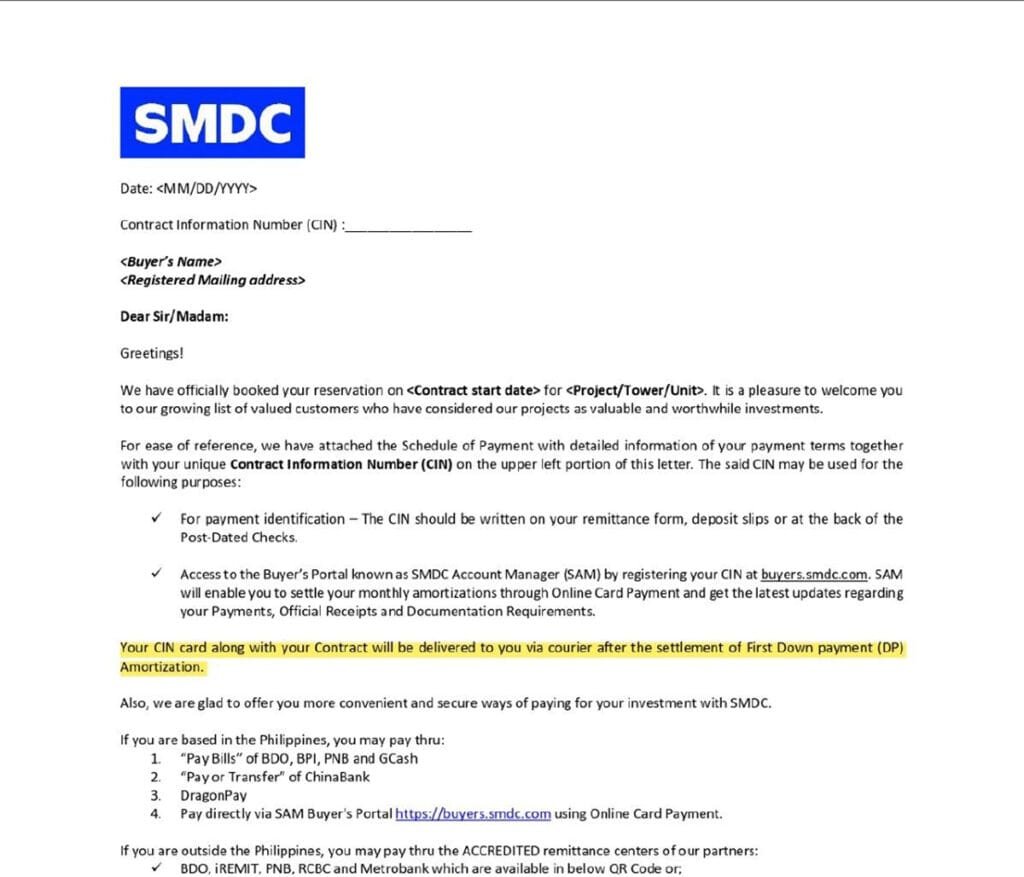
Your 11-digit Contract Information Number (CIN) is your payment identity. Think of it as your account number—without it, SMDC cannot identify who sent the payment or which unit it should be credited to.
Where to find your CIN:
- Thank You Letter (received after reservation)
- Statement of Account
- Schedule of Payment
- Official correspondence from SMDC
Critical rule: Include your CIN in every payment transaction. Write it in the remarks section for online payments, on the back of checks, or in the subscriber number field for bills payment. Missing or incorrect CIN numbers are the #1 reason payments aren’t posted properly.
💡 Pro Tip: Save your CIN in your phone’s notes app with a label like “SMDC Payment – CIN” so you always have it handy when making payments.
Payment Timing: When to Pay Based on Your Channel
Not all payment methods post at the same speed. To ensure your payment is credited before your due date, you need to pay earlier depending on which channel you use:
Payment Timing Chart:
| Payment Method | Pay Before Due Date |
|---|---|
| BDO Online/OTC, PNB, China Bank | 1 banking day |
| BPI Online, GCash QR, BDO Pay QR | 1 banking day |
| BPI OTC, GCash Pay Bills, Maya | 2 banking days |
| SM Store/Business Center | 2 banking days |
| DragonPay, iPay88 | 2 banking days |
| Bayanipay | 4 banking days |
| International Remittance | 4 banking days |
⚠️ Important: Banking days exclude weekends and holidays. If your due date is Monday, and you’re using GCash Pay Bills (2 banking days), you must pay by Thursday at the latest.
Understanding Payment Posting
Payment date (when you send money) and posting date (when SMDC receives and credits it) are different. The timing chart above accounts for this processing period. Always plan ahead to ensure posting happens before your deadline.
Online Payment Methods: The Fastest and Most Convenient
Online payments have become the preferred method for SMDC buyers due to their speed, convenience, and reliability. Here are all your digital payment options.
Bank Online Banking (BDO, BPI, China Bank, PNB, Metrobank, RCBC)
Best for: Regular monthly payments, scheduling ahead, buyers who prefer direct bank transfers
Posting time: 1-2 banking days depending on bank
Setup time: 5-10 minutes (one-time enrollment)
How Online Banking Works:
- Enroll SMDC as a biller in your online banking platform (one-time setup)
- Enter your CIN as the subscriber/account number
- Schedule your payment (immediately or future date)
- Receive confirmation with reference number
Bank-by-Bank Quick Guide:
BDO Online Banking:
- Login → Add Company/Biller → Select company name (e.g. SM Development, Vancouver Lands, Inc) from dropdown
- Enter 11-digit CIN as Subscriber Number
- Enter Buyer’s Name as Subscriber Name
- Pay via: Pay → Pay Bills → Real Estate category
- Timing: Pay 1 banking day before due date
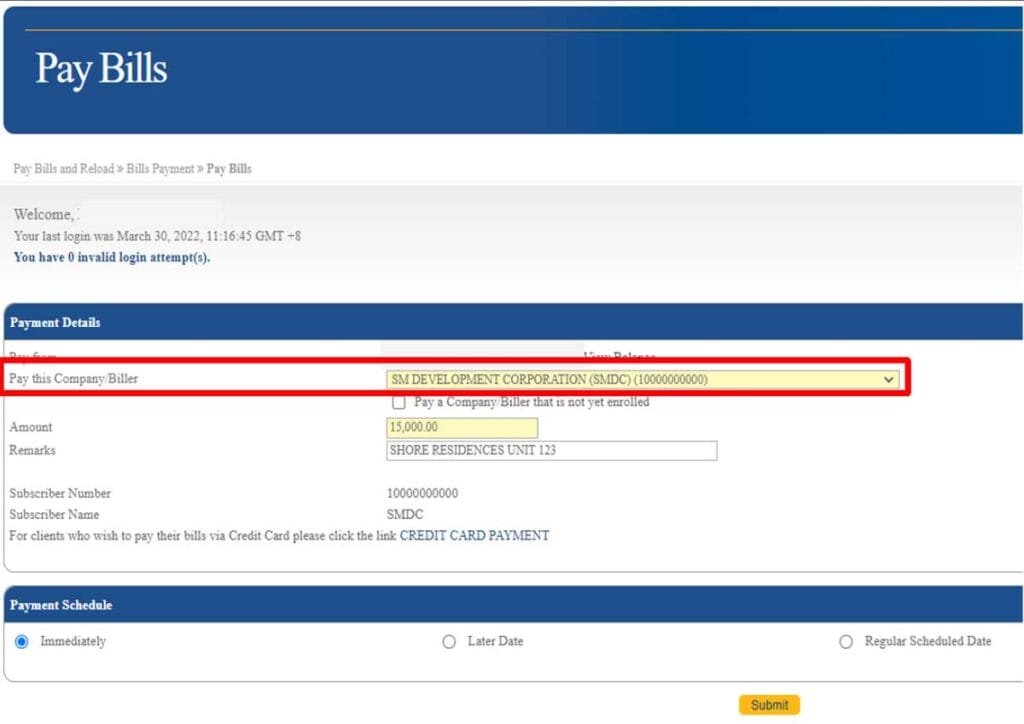
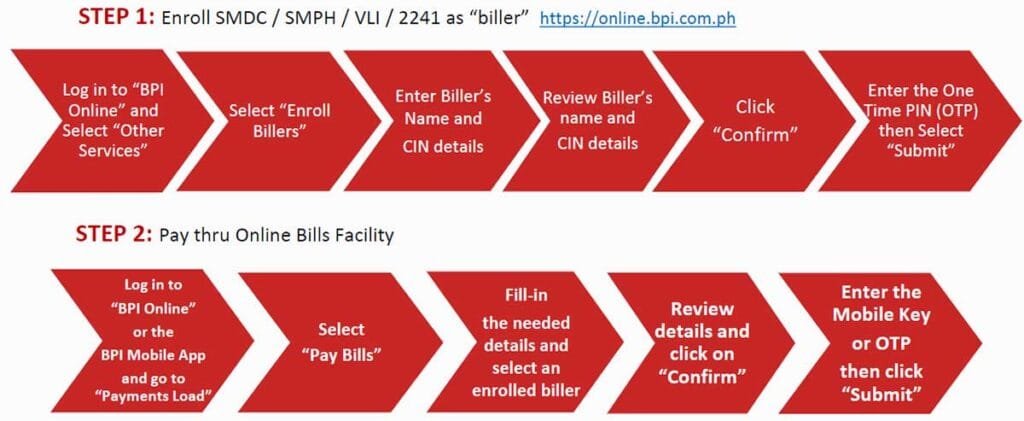
BPI Online Banking:
- Login → Other Services → Enroll Billers → Search company name (e.g. SM Development, Vancouver Lands, Inc)
- Enter CIN and buyer’s name
- Pay via: Payments/Load → Pay Bills → Select enrolled biller
- Timing: Pay 1 banking day before due date (online), 2 days (OTC)
China Bank Online:
- Login → Pay or Transfer → To Billers → Add Biller
- Select company name (e.g. SM Development, Vancouver Lands, Inc) from dropdown
- Enter CIN as Subscriber Number
- Timing: Pay 1 banking day before due date
- Note: Only for SM Development Corporation (SMDC), SMPHI, Vancouver Lands Inc., 2241 Properties Inc.
PNB Online Banking:
- Login → Pay Bills → Choose Real Estate category
- Select company name (e.g. SM Development, Vancouver Lands, Inc) as company
- Enter CIN as account number
- Timing: Pay 1 banking day before due date
- Note: Only for SM Development Corporation (SMDC) projects
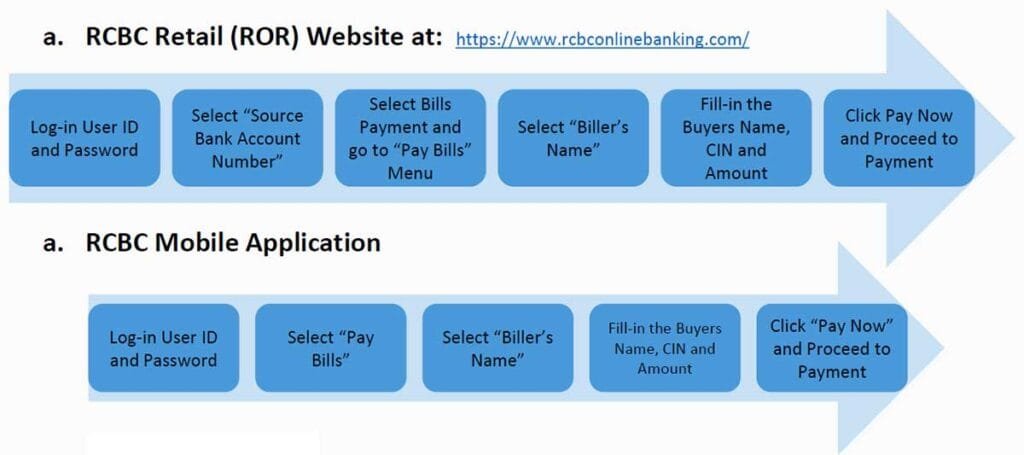
RCBC Online Banking:
- Login → Source Bank Account number → Bills Payment
- Select company name (e.g. SM Development, Vancouver Lands, Inc) as company
- Enter CIN as account number
- Timing: Pay 1 banking day before due date
- Note: Only for SM Development Corporation (SMDC) projects
Read our detailed guide: “BDO vs BPI vs China Bank: Best Online Banking for SMDC Payments”
💡 Pro Tip: Most banks allow you to schedule recurring payments on the same date each month. Set it up once, and never worry about missing a deadline again.
E-Wallets: GCash and Maya
Best for: Mobile-first users, quick payments on-the-go, buyers without traditional bank accounts
Posting time: 2 banking days
Setup time: 2 minutes
GCash Pay Bills (The Right Way):
- Open GCash app → Select Pay → Choose Pay Bills
- Select Real Estate category
- Choose company name (e.g. SM Development, Vancouver Lands, Inc)
- Fill in required details:
- 11-digit CIN
- Buyer’s Name
- Project Name (dropdown)
- Payment Type
- Amount
- Email address (for confirmation)
- Confirm payment → Receive SMS confirmation
VISUAL PLACEHOLDER: Step-by-step screenshots of GCash Pay Bills process for SMDC

⚠️ Critical Warning: Do NOT use “Send Money” in GCash or Maya. Only use “Pay Bills” → Real Estate category. Send Money transactions cannot be identified by SMDC and will result in unposted payments.
Maya Pay Bills:
The process is nearly identical to GCash:
- Login → Bills → Real Estate → Select company name (e.g. SM Development, Vancouver Lands, Inc)
- Enter CIN, amount, buyer’s name, contact, project name
- Bill status moves from “Processing” to “Completed” once posted
- Add to Favorites for faster future payments
Timing: Pay 2 banking days before due date for both GCash and Maya
Read our comparison guide: “GCash vs Maya: Which is Better for Paying Your SMDC Property?”
Payment Gateways: DragonPay and iPay88
Best for: Buyers paying from regional banks (Singapore, Hong Kong, Malaysia), international online banking, credit/debit card payments
Posting time: 2 banking days
Setup time: None (direct payment portal)
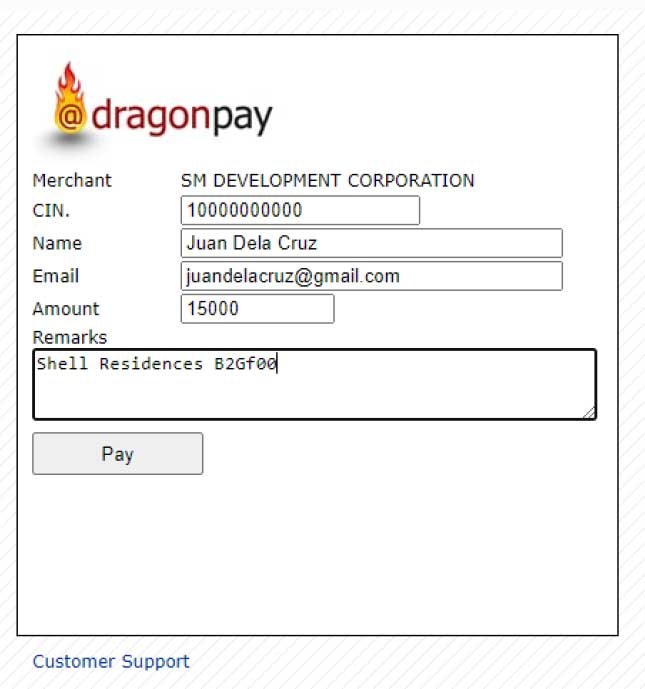
DragonPay Payment Process:
DragonPay supports multiple payment channels including online banking from various countries and regions.
- Go to SMDC DragonPay portal (specific link depends on your SMDC company)
- Fill in payment details:
- 11-digit CIN
- Buyer’s complete name
- Email address
- Amount to pay
- Remarks (Project & Unit)
- Select payment channel from dropdown
- Review transaction summary
- Complete payment through selected channel
- Receive email confirmation
iPay88 (Card Payments via SMDC Account Manager):
Perfect for credit/debit card payments:
- Login to SMDC Account Manager (buyers.smdc.com)
- Click Card Payment icon
- Select project and unit → Click Pay
- Accept Terms & Conditions
- Enter amount and email
- Complete payment through gateway
- Receive confirmation email
Minimum payment: ₱15.00
Timing: Pay 2 banking days before due date
Note: iPay88 not available for SHDC projects
Learn more: “Complete Guide to DragonPay Regional Banking for SMDC”
Over-the-Counter (OTC) Payment Options
Prefer paying in person? SMDC offers multiple physical payment locations for cash, check, and card payments.
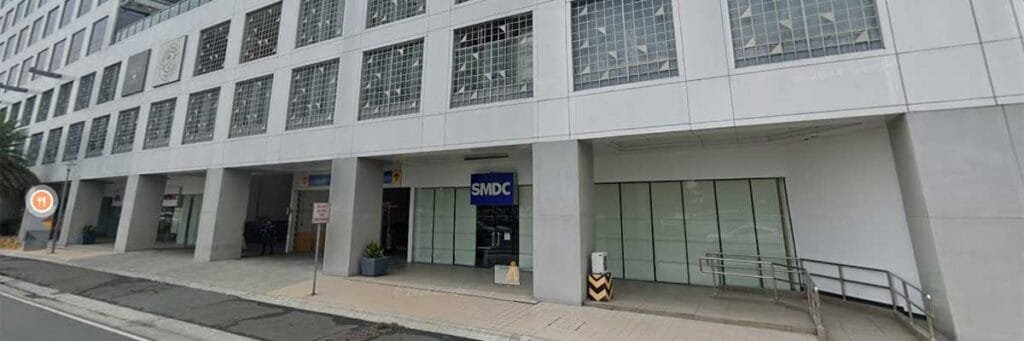
SMDC Payment Center (The Official Payment Hub)
Location: G/F Two E-com Center, Ocean Drive, MOA Complex, Pasay City | Get Direction
Operating Hours: Monday to Friday, 9:00 AM – 5:00 PM
Accepted: Cash, check, debit/credit cards, QR payments
Posting time: 1 banking day
What to Bring:
- Valid government-issued ID
- Payment amount (cash, check, or card)
- Your 11-digit CIN (memorized or written down)
Payment Process:
- Get queuing number at Reception
- Present payment to cashier when called
- Receive official receipt
⚠️ Important Rules:
- Cash payments over ₱50,000 must be made at BDO branch Bills Payment Facility
- For USD payments, the amount will be converted to Peso at the company’s prevailing rate upon receipt.
- Third-party sellers cannot transact without buyer’s authorization
- For credit/debit cards, down payments ₱100,000+ may require bank approval
💡 Pro Tip: Visit during mid-morning (10:00-11:00 AM) to avoid peak hours and minimize wait time.
Bank Over-the-Counter Payments
Can’t reach the SMDC Payment Center? You can pay at major bank branches nationwide.
BDO Branch (OTC):
- Go to nearest BDO branch
- Fill out Bills Payment Slip:
- Payment Date
- Payee Name (SMDC + institution code)
- Subscriber No. (11-digit CIN)
- Subscriber Name (Your name)
- Mode of Payment (Cash or Check)
- Present slip and payment to teller
- Receive machine-validated payment slip
- Timing: Pay 1 banking day before due date
BPI Branch (OTC via BEA):
- Go to BPI Express Assist (BEA) machine
- Choose Bills Payment → Other Merchants
- Enter CIN and payment details
- Get queue number
- Present to teller with merchant name (SMDC) and buyer’s name
- Receive validated deposit slip
- Timing: Pay 2 banking days before due date
See complete bank guide: “Which Banks Accept SMDC Payments Over-the-Counter?”
SM Stores and SM Retails Business Centers
You can pay your SMDC property while shopping at any SM mall—convenient for busy buyers.
Payment Steps:
- Go to SM Retails Business Center (check mall directory)
- Fill out Bills Payment Slip:
- Payment Date
- Payee Name (SMDC company name only)
- Subscriber No. (11-digit CIN)
- Subscriber’s Name (Buyer’s name)
- Mode of Payment (Cash or Check)
- Present slip and payment to teller
- Receive machine-validated payment slip
Timing: Pay 2 banking days before due date
VISUAL PLACEHOLDER: Photo of Bills Payment Slip filled out correctly with annotations
QR Code Payments at Payment Center
Modern and contactless! The SMDC Payment Center accepts QR payments through multiple platforms.
Supported QR Payment Methods:
- GCash QR: Request from cashier → Scan → Enter amount → Confirm
- BDO Pay QR: Open BDO Pay app → Scan QR → Enter amount → Confirm
- Maya Scan to Pay: Open Maya → Scan QR → Enter amount → Confirm
- QRPh (Universal): Use any QRPh-enabled bank/e-wallet app
QRPh Compatible Apps: All Bank, Asia United Bank, China Bank, Land Bank, RCBC, UnionBank, and more
Timing: Pay 1 banking day before due date
Related: “SMDC Payment Center Guide: Everything You Need Before Your Visit”
Automatic Payment Options: Set It and Forget It
Tired of remembering payment dates? Set up automatic payments and never miss a deadline.
Auto-Debit Arrangement (ADA)
Best for: Consistent monthly income, buyers who want zero payment hassle
Available banks: BDO, BPI (e-ADA), China Bank, Security Bank
Setup time: 3-7 days processing
How ADA Works:
Your bank automatically deducts your monthly amortization on a scheduled date and sends it directly to SMDC. You don’t lift a finger.
General Enrollment Steps:
- Download ADA enrollment form from your bank (or online)
- Fill out complete details including CIN
- Sign Terms & Conditions
- Prepare supporting documents:
- Two valid government IDs with signature
- Proof of bank account (statement, passbook, or validated slip)
- Submit in sealed envelope to your Property Specialist
[VISUAL PLACEHOLDER: Sample ADA enrollment form with key fields highlighted]
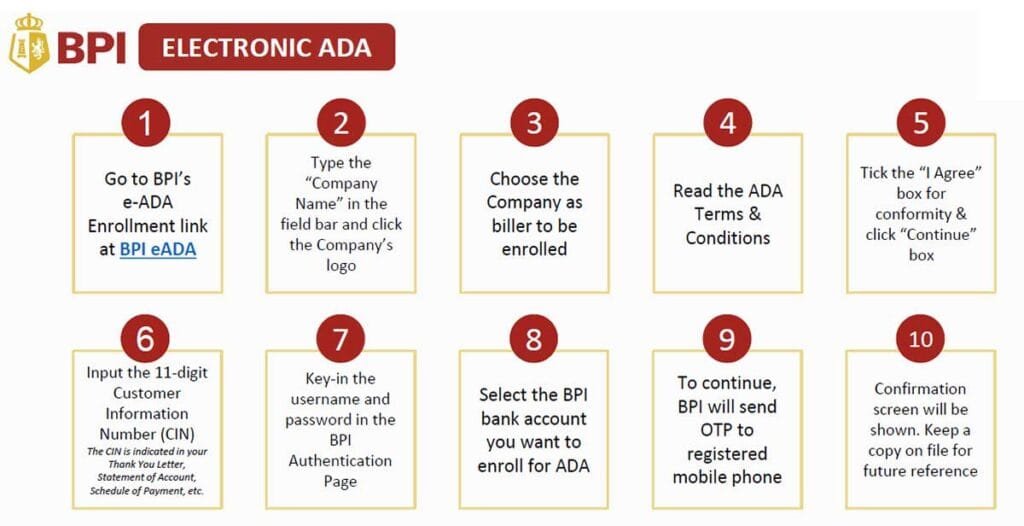
BPI e-ADA (Electronic Enrollment):
BPI offers online enrollment—no physical forms needed:
- Go to BPI e-ADA enrollment portal (bpi-ada.com)
- Tick “I Agree” → Select SMDC as company
- Input your 11-digit CIN
- Authenticate with BPI username/password
- Enter OTP sent to registered mobile
- Select bank account for auto-debit
- Keep confirmation screen for records
⚠️ Important: Only enroll after your reservation is confirmed and you’ve received your CIN. Holding numbers cannot be enrolled.
Complete setup guide: “SMDC Auto-Debit Setup: Never Miss a Payment Again (Step-by-Step)”
Post-Dated Checks (PDCs)
Best for: Buyers who prefer traditional payment methods, corporate buyers, those without online banking
PDC Requirements:
- Issue checks according to your Schedule of Payment (SOP)
- Pay to the order of: [SMDC Company Name]
- Date format: MM-DD-YYYY (PCHC standard)
- Write your 11-digit CIN on the back of every check
- Amount in words must match figures
- No alterations on Peso checks; countersigned alterations on USD checks only
Third-Party Checks:
If checks are from another person/corporation:
- Individual: Authorization letter + photocopy of account holder’s government ID with signature
- Corporation: Notarized Secretary’s Certificate authorizing check use
- Sole Proprietor: DTI Registration Certificate showing buyer as owner
Submission: Submit PDCs to your Property Specialist or SMDC Payment Center
See detailed requirements: “Post-Dated Checks for SMDC: Formatting Rules and Requirements”
International Payments: Guide for OFWs and Overseas Buyers
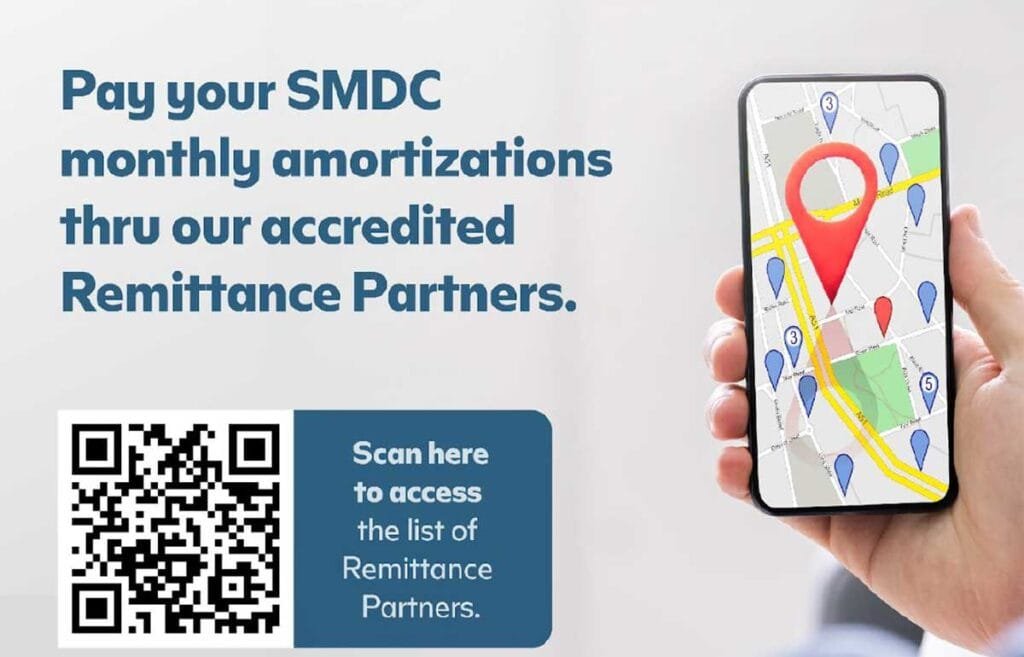
Paying from abroad? SMDC accepts international remittances through accredited partners.
How International Remittance Works
Payment Flow: Your Remittance Center → Intermediary Bank(s) → Local Receiver Bank → SMDC
Critical Timing: Pay 4 banking days before due date to account for international processing time.
Accredited Remittance Partners
BDO Remittance (Recommended):
- Go to nearest BDO remittance center
- Fill out Remittance Acceptance Form:
- Remitter’s Name (Buyer’s Name)
- Present Home Address (First line: your 11-digit CIN, then your full address)
- Beneficiary Name (SMDC Company Name)
- Transaction Amount
- Beneficiary Account No. (get from Property Specialist)
- Present valid ID with payment and service fee
- Submit Proof of Payment (see next section)
Other Accredited Partners:
- iRemit: Similar process, available internationally
- PNB Remittance: For PNB account holders
- RCBC Remittance: Network of branches worldwide
Submitting Proof of Payment (POP)
⚠️ Critical Step: After sending remittance, you MUST submit proof of payment to SMDC through one of three official channels:
Method 1: POP Portal (Recommended)
- Upload to: http://smdc.com/pop-portal/
- Include clear photo/scan of remittance receipt
Method 2: Email
- Send to: buyerspaymentslip@smdevelopment.com
- Email Subject Format: “Payment FAO CIN [your 11-digit CIN] for the month of [Month]”
- Attach clear copy of receipt
Method 3: Viber (Buyers Only)
- Send to: 0917-8798850
- Include: Buyer’s name, CIN, Seller’s name, photo of receipt
- Note: This number is STRICTLY for POP submission only—no inquiries or calls
💡 Pro Tip for OFWs: Set a monthly reminder 5 days before your due date to initiate remittance, accounting for the 4-banking-day processing time plus 1 day buffer.
Complete guide: “OFW’s Guide: How to Pay Your SMDC Property from Abroad (Saudi Arabia, UAE, Singapore, Hong Kong)”
Payment Mistakes to Avoid
Learn from others’ errors—here are the most common payment mistakes and how to avoid them.
❌ Mistake #1: Using InstaPay or “Send Money” Features
The Problem: Regular bank transfers, InstaPay, GCash Send Money, and Maya Send Money don’t include proper biller identification. SMDC receives the money but cannot identify who sent it or which unit to credit.
The Solution: Always use the Bills Payment facility:
- Banks: Use “Pay Bills” feature, not “Transfer” or “Send Money”
- GCash/Maya: Use “Pay Bills” → Real Estate category, never “Send Money”
- Specifically look for SMDC in the biller directory
❌ Mistake #2: Forgetting the CIN
The Problem: Payments without CIN end up in SMDC’s unidentified payments pool and won’t be credited to your account automatically.
The Solution:
- Write CIN in remarks/comments for online payments
- Write CIN on back of checks
- Include CIN on remittance forms (in the address field as first line)
- Double-check CIN before submitting payment
❌ Mistake #3: Paying Too Close to the Deadline
The Problem: You paid on your due date, but it posts 2 days later—now you have a late payment penalty.
The Solution: Follow the timing chart provided earlier. Each payment channel has different processing times. Mark your calendar to pay early based on your chosen method.
❌ Mistake #4: Using Non-Accredited Remittance Centers
The Problem: Some remittance centers aren’t partnered with SMDC, causing delays or unidentified payments.
The Solution: Only use accredited partners: BDO Remit, iRemit, PNB remittance, RCBC network. Verify with your Property Specialist if unsure.
❌ Mistake #5: Not Keeping Payment Proof
The Problem: You claim you paid, but have no confirmation receipt or reference number—difficult to trace payment.
The Solution:
- Screenshot every online payment confirmation
- Save all reference numbers
- Keep physical receipts from OTC payments
- Take photos of checks before submitting
- Save all email confirmations
Troubleshooting guide: “SMDC Payment Not Posted? Here’s How to Fix It (Step-by-Step)”
Frequently Asked Questions (FAQ)
Your CIN is an 11-digit number that identifies your SMDC property account. You’ll find it on your Thank You Letter (received after reservation), Statement of Account, Schedule of Payment, and any official SMDC correspondence. This number must be included in every payment you make.
It depends on your payment method. Online banking through BDO, PNB, or China Bank requires 1 banking day before your due date. GCash Pay Bills, Maya, and SM Store require 2 banking days. International remittances need 4 banking days. Always account for weekends and holidays when counting banking days.
Yes, but you must use the “Pay Bills” feature, not “Send Money.” Open the app, select Pay → Pay Bills → Real Estate category → Choose SMDC. Enter your 11-digit CIN, buyer’s name, and payment amount. Using Send Money will result in unidentified payments that won’t be credited to your account.
Your payment will be received by SMDC but cannot be automatically credited to your account since they don’t know who sent it. Contact your Property Specialist immediately with your payment proof (reference number, receipt, screenshot) so they can manually identify and post your payment. To avoid this, always double-check that your CIN is included before confirming any payment.
Yes, you can pay ahead of your schedule. Simply pay the total amount for the months you want to cover. Make sure to indicate in the remarks which months you’re paying for, along with your CIN. SMDC will apply the payment according to your Schedule of Payment.
Use accredited remittance partners like BDO Remit, iRemit, PNB remittance, or RCBC network. Fill out the remittance form with your CIN as the first line of your address field. After sending, you must submit Proof of Payment to SMDC through their POP Portal, email (buyerspaymentslip@smdevelopment.com), or Viber (0917-8798850). Pay 4 banking days before your due date.
Online banking through BDO, PNB, or China Bank posts in 1 banking day, making them the fastest options. QR code payments at the SMDC Payment Center also post in 1 banking day. If speed is your priority, choose these methods and pay one day before your deadline.
Yes, but make sure the payment includes your CIN so it’s properly credited. For checks from another person, you’ll need to provide an authorization letter and a photocopy of the account holder’s government ID with signature. At the Payment Center, sellers cannot transact without the buyer’s authorization.
Check your SMDC Account Manager online portal, wait for your monthly Statement of Account, or contact your Property Specialist. Always keep your payment confirmation (reference number, receipt, screenshot) as proof. Most payments reflect within the stated processing time based on your payment method.
First, verify you paid within the required timeframe based on your payment method. Check that you included your CIN correctly. If everything was done properly but payment still isn’t posted, contact your Property Specialist immediately with your payment proof (reference number, screenshot, receipt). They can trace and manually post your payment.
Conclusion: Choose Your Payment Method and Pay with Confidence
You now have complete knowledge of every way to pay your SMDC property. Whether you prefer the speed of online banking, the convenience of e-wallets, the familiarity of over-the-counter payments, or the automation of auto-debit arrangements, you have options that fit your lifestyle.
Key Takeaways:
- Always include your 11-digit CIN in every payment
- Pay early based on your chosen method’s processing time (1-4 banking days before due date)
- Use “Pay Bills” features, never “Send Money” or InstaPay for GCash/Maya
- Keep all payment confirmations and reference numbers
- OFWs must submit Proof of Payment after sending remittances
Your Next Steps:
- Find your CIN on your Thank You Letter or Statement of Account
- Choose your preferred payment method from the options above
- Mark your calendar to pay early based on that method’s timing requirements
- Set up your first payment following the step-by-step instructions
- Keep your confirmation for proof and peace of mind
Ready to make your property ownership even easier?
Browse our available SMDC properties | Speak with a Property Specialist